


Cruise Wi-Fi Packages: How Much Internet Do You Actually Need?
Before you pay for Wi-Fi at sea, figure out what you actually need it to do.
I'm probably not the cruise line's dream customer when it comes to selling Wi-Fi.
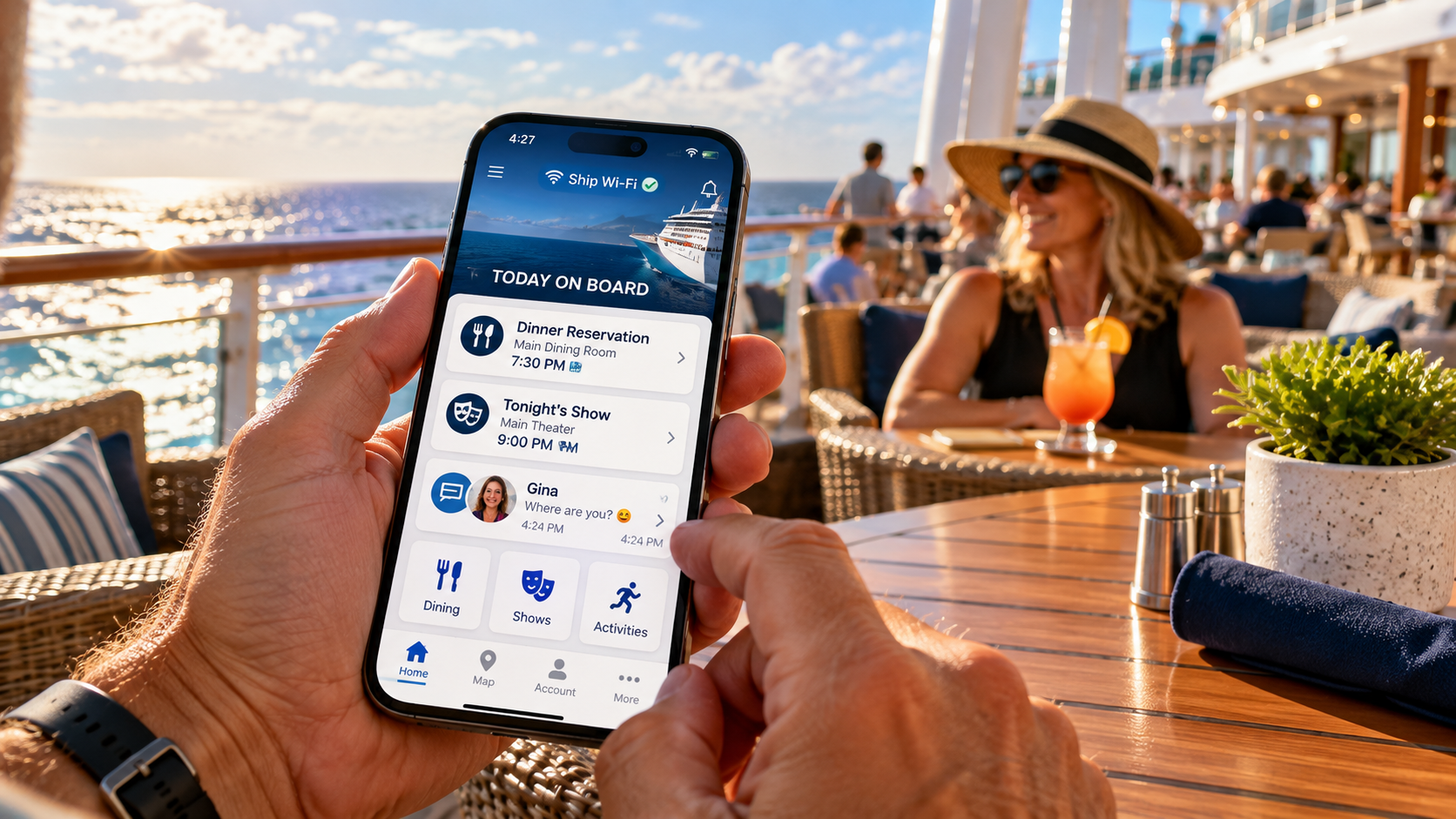
Gina and I bring our phones. We take pictures, check the cruise-line app, look at menus and schedules, and occasionally try to answer that all-important question:
“Where are you?”
Beyond that, we don't need much internet at sea. In fact, we've never purchased a cruise Wi-Fi package.
But that's how we cruise.
You might want to FaceTime the grandkids every night. Post vacation pictures to Facebook. Stream Netflix before bed. Check the security cameras at home. Answer work emails. Join a Teams meeting.
Your vacation. Your money. Go for it.
But you and I probably shouldn't buy the same Wi-Fi package.
The real question isn't whether cruise Wi-Fi is worth buying.
It's how much internet do you actually need?
Before You Buy Anything, Check What You Already Have
Here's where you might save some money before even looking at packages.
Depending on your cruise line and fare, you may already have access to:
The ship's app and onboard information
Passenger-to-passenger messaging
Included internet or complimentary Wi-Fi minutes
Wi-Fi through a bundled fare, suite or loyalty benefit
Cellular service while visiting ports
The cheapest internet package is the one you've already paid for.
And in some cases, you may not need a package at all.
The Cruise-Line App May Be All You Need
Here's an important distinction:
Connecting to the ship's Wi-Fi network isn't necessarily the same thing as buying internet access.
Many cruise-line apps work through the ship's onboard network, allowing passengers to use certain features without purchasing an internet package.
Depending on the cruise line, those features may include schedules, dining information, reservations, deck maps, onboard accounts and messaging.
Disney Cruise Line is a particularly clear example. Its Navigator app provides schedules, dining information and onboard chat. Disney confirms that passengers can connect to the ship's network to use the app without buying internet access.
Other cruise lines also offer onboard app features, but exactly what's free varies. In particular, don't assume messaging between passengers is complimentary just because the app itself is free.
Check those details before sailing, and download the app at home.
For someone like me, this is a big deal.
I don't need Netflix to find out when the evening show starts.
And finding my wife shouldn't necessarily require two expensive internet packages.
What Do You Actually Want to Do Online?
Let's keep this simple.
🟢 Stay connected
Messaging, email, browsing, social media and occasionally checking things at home.
Start with the basic package, if you need to purchase one at all.
🟡 Use the internet pretty normally
Posting photos and videos, FaceTime, internet calling, larger files and switching between devices.
Check whether those activities are supported before choosing a package.
🔴 Stream or work
Netflix, YouTube, Teams, Zoom, VPN access and large downloads.
A higher-tier package may be appropriate. Just remember that supporting video calls doesn't guarantee a flawless connection during every meeting.
And one important detail: Premium doesn't mean the same thing on every cruise line. One line's Premium package might support streaming, while another line reserves that for a separate tier.
One Device Doesn't Always Mean One Phone
This is probably the most confusing part of buying cruise Wi-Fi.
Suppose Gina and I both want internet access on our phones at the same time.
We need two simultaneous connections.
Simple enough.
Now suppose I also brought a laptop.
Do I automatically need three connections?
Not necessarily.
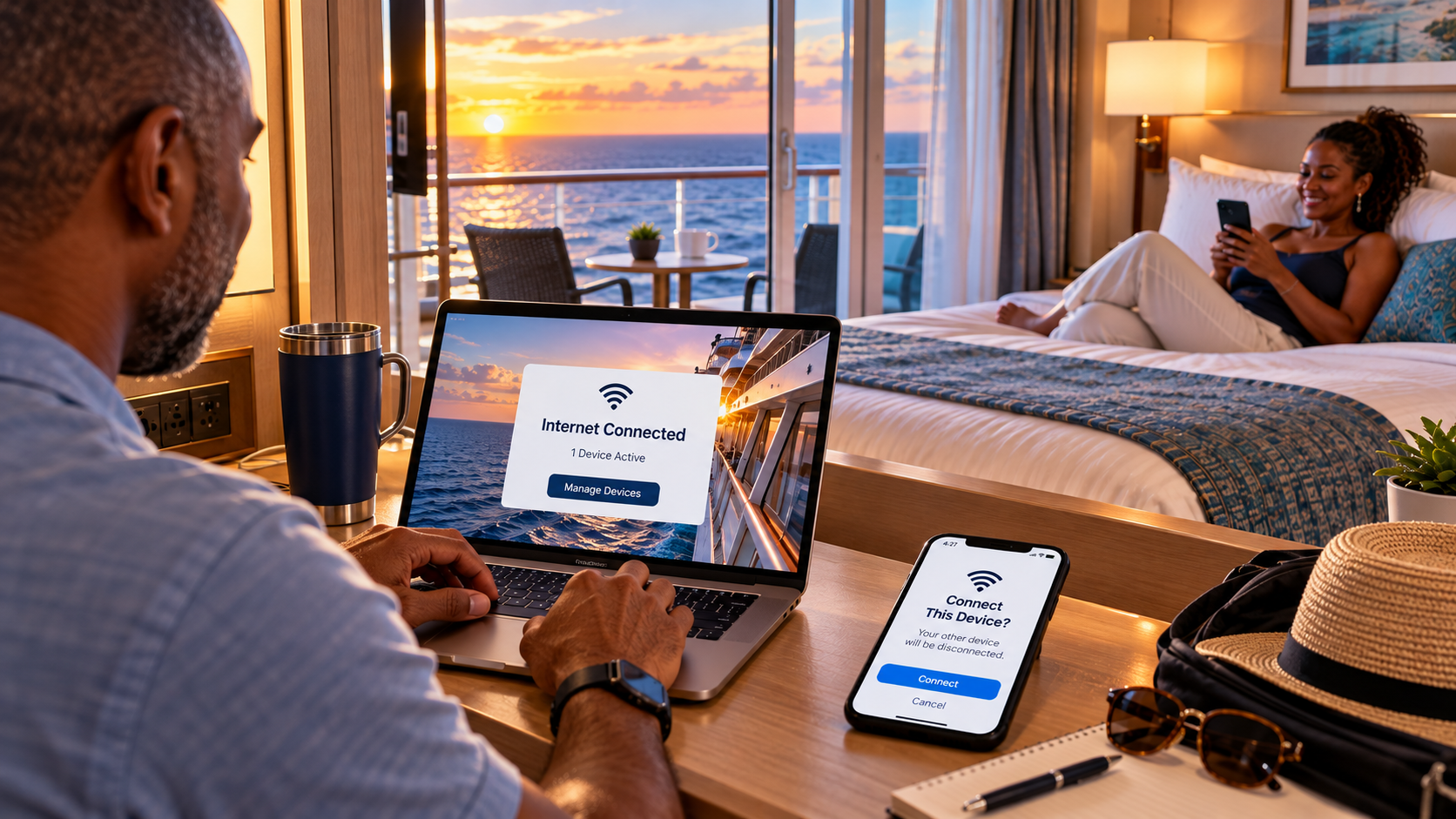
Some cruise lines allow you to disconnect one device and reconnect another using the same internet entitlement.
That means your phone and laptop don't necessarily need to be online simultaneously.
Carnival, for example, allows switching between devices on its regular plans, with only one device active at a time per standard plan. It also sells a separate multi-device Premium package for up to four simultaneous connections.
But not every line follows the same rules.
MSC's registered-device restrictions are an important example of why you should verify whether devices can be changed after activation.
Before purchasing, ask:
How many devices need internet simultaneously, and can I switch between them?
That question could save you from buying more connections than you need.
How the Major Cruise Lines Compare
Here's the short version of what makes each line different.
Cruise line
What to know before buying
Royal Caribbean
VOOM offers internet for browsing, video calls and streaming, with multi-device options.
Carnival
Social, Value and Premium tiers, plus a separate multi-device Premium option.
MSC
Browse and Browse & Stream. Pay particular attention to device registration and switching rules.
Virgin Voyages
Wi-Fi inclusions depend on the fare. Check what's included before upgrading.
Celebrity
Basic and Premium options. Premium supports more demanding activities, including streaming.
Norwegian
Free at Sea may already include Wi-Fi minutes; Free at Sea Plus adds unlimited streaming internet.
Disney
Separate paid internet options, but the Navigator app and onboard chat work without purchasing internet.
Princess
Plus includes one-device connectivity per guest; Premier includes four devices per guest.
Holland America
Surf, Premium and Stream tiers. Check whether your Have It All package includes internet.
For Norwegian, current Free at Sea information advertises 150 minutes per guest for eligible bookings, although older reservations and promotions can carry different allowances. Princess also confirms the device inclusions in its current Plus and Premier offerings.
Package names, inclusions, pricing and device policies can change. Always check the terms attached to your actual sailing rather than relying on a generic price chart.
You can review the offerings directly through Carnival's internet plans, Norwegian's Free at Sea benefits, and Princess Plus and Premier packages.
Sometimes Included Wi-Fi Is All You Need
We've never actually purchased a cruise Wi-Fi package.
We've had internet included with a cruise fare, and we've used it because, well...
Free is a pretty good price.
That was also our experience on a Viking river cruise in Europe.
Wi-Fi was included, so we connected to the ship's network. But our phones also maintained ordinary cellular service for virtually the entire cruise, aside from occasional dead spots along the river.
We generally used the included Wi-Fi because it placed less demand on our phone batteries than relying on cellular coverage throughout the day.
But if Viking had charged separately?
We wouldn't have bought it.
Our existing cellular coverage was adequate for what we needed.
That's an important distinction between European river cruising and an ocean cruise with days at sea.
On a river, you may spend much of the journey within reach of ordinary cellular networks.
Fifty miles offshore is another matter.

Your Phone May Already Have Another Way to Connect
Once you're in port, your regular cellular plan may work just fine.
Depending on your carrier and destination, international data might already be included, or an international day pass could be an economical alternative.
That doesn't necessarily help on a sea day, but it could reduce how much shipboard internet you need.
There's also one connection I would be careful about:
Cellular at Sea.
Some cruise ships operate maritime cellular networks that connect through satellite systems. That's separate from the ship's Wi-Fi and may carry charges that aren't covered by your ordinary domestic or international roaming plan.
If you want to avoid accidental maritime roaming, put your phone in airplane mode and turn Wi-Fi back on deliberately to connect to the ship's network.
Check your carrier's cruise-ship rates before departure.
I'd rather know what a connection costs before using it than discover the answer on next month's phone bill.
Starlink Has Improved Cruise Wi-Fi. It Hasn't Made It Magic.
Modern satellite technology has made streaming, video calls and ordinary internet use much more practical at sea.
But there's a difference between supported and guaranteed.
Connections can slow down, drop or behave differently depending on ship location, network demand and other conditions.
For most passengers, that's an inconvenience.
For someone whose livelihood depends on a particular meeting, secure VPN or large file transfer, it's something to consider before sailing.
If missing a Teams meeting would merely be annoying, shipboard internet may be perfectly adequate.
If missing it could cost you a client or contract, have a backup plan.
The Curated Upgrades Take
You don't need a degree in satellite communications to buy cruise Wi-Fi.
Before purchasing, answer four questions:
What do I actually want to do online?
How many people or devices need to be connected simultaneously?
Can I switch between devices?
What connectivity have I already paid for?
That's really it.
Gina and I don't need much. Two phones, pictures, the cruise app, menus and the occasional:
“Where are you?”
Someone else might want Netflix every night.
Someone might want to FaceTime family.
Someone might need to work.
Nobody is doing it wrong.
But there's no reason for any of us to pay for internet we aren't going to use.
Start with what's included. Figure out what's missing. Then buy the Wi-Fi that fits the way you cruise, not whichever package the cruise line makes sound the fanciest.
Travel Smarter. See More.