


Build Your Travel Infrastructure Before You Leave Home
Email folders, calendars, offline maps, checklists and carefully chosen backups can keep your trip working when the internet—or the itinerary—does not.
A well-organized trip should not require you to become a full-time administrator.
You do not need a complicated spreadsheet tracking every cup of coffee, a three-ring binder arranged by hour or a document telling you what to do every minute of the day.
This is not the Normandy invasion.
It is a vacation.
But reservations, confirmation numbers, addresses and travel documents have a habit of scattering themselves across email accounts, apps, screenshots and pieces of paper. That usually becomes a problem at precisely the wrong moment—when the Wi-Fi disappears, the rental-car counter cannot locate your reservation or you need the address of tonight’s lodging.
The solution is not to plan every moment.
It is to create a simple travel infrastructure before you leave home.
Once that foundation exists, each trip becomes easier to organize. You know where confirmations belong, which information needs to be available offline and what requires a backup.
The system handles the details so you can remain spontaneous.
The goal is not to document every part of the vacation. It is to make important information easy to find when you need it.
Give Every Trip an Email Home
My travel-planning system begins with one main email folder:
TRAVEL & TRIPS
Every trip receives its own folder—even a weekend trip.
A short getaway may need only one folder containing the hotel, event tickets and transportation confirmation. A longer or more complicated trip may receive subfolders such as:
Dining
Experiences
Flights
Lodging
Rental cars
I also maintain a separate folder for rewards programs. That gives membership information, account correspondence and promotional offers a consistent home without mixing them into a particular trip.
The point is not to create an elaborate filing cabinet. It is to make the original confirmation easy to retrieve.
When an airline changes a schedule, a hotel modifies a reservation or an excursion company sends meeting instructions, that email goes into the appropriate trip folder.
Then, if an app does not load or a company cannot immediately find the booking, I still have the original record.
A short trip may need only a handful of messages. A major international trip may accumulate considerably more. The same structure works for both.

Let Each Tool Do One Job
Not every piece of travel information belongs in the same place.
My system uses a few simple tools, each with a specific purpose:
Email holds the original confirmations and correspondence.
If I need to prove what I reserved, what I paid or what the company promised, the original message should be there.
Master document
The master document contains important trip information in one concise reference.
Depending on the trip, that may include:
Flight numbers and departure times
Lodging names, addresses and telephone numbers
Rental-car information
Transportation arrangements
Confirmation numbers
Important contacts
Critical next-step instructions
It is not intended to become a minute-by-minute schedule.
I may note what comes next when the transition is important—such as where to collect a rental car after landing or which ferry must be reached—but I do not need to record every meal or casual stop.
Calendar
The calendar holds reservations and useful reminders.
When I receive a confirmation, I generally add the relevant event to the calendar while the information is already in front of me.
That might include:
Flights
Lodging dates
Rental-car pickup and return
Dinner reservations
Tours and timed admissions
Contact details
Cancellation deadlines
Useful alerts
For a rental car, I may schedule a reminder an hour before the return time. That provides enough warning to refuel, gather our belongings and reach the return location without turning the entire day into a countdown.
Offline phone folder
The offline folder contains copies of essential information that must remain accessible without Wi-Fi or cellular service.
On both my phone and Gina’s, I use simple categories:
Air
Car
Lodging
Events
We do not need two different systems. We need the same essential information available on two devices.
Paper backup
I still carry a small amount of paper because phones can be lost, damaged or drained.
Yes, I am from the 1900s.
But I am selective. I do not print every confirmation or carry a binder containing the entire trip.
The paper file is an emergency backup—not a traveling office.
Give each tool one job, and the system remains simple.

Build the System as You Book
The easiest time to organize a reservation is immediately after making it.
When a confirmation arrives:
Move the email into the trip folder.
Add the reservation to the calendar if timing matters.
Add the essential information to the master document.
Save an offline copy if you may need it without internet access.
That usually takes only a couple of minutes.
Waiting until the night before departure turns a series of tiny tasks into a large project. Handling each reservation when it arrives spreads the work across the entire planning period.
I still keep an ordinary notepad beside my laptop for unfinished tasks.
It might say:
Reserve Ballater lodging
Confirm rental-car insurance letter
Download maps
Charge camera batteries
Make Sunday roast reservation
There is nothing sophisticated about it. It works because I can see what remains unfinished without cluttering the master document with a long administrative checklist.
The master document tells me what I need to know.
The notepad tells me what I still need to do.
Use the Calendar for More Than Appointments
Travel apps are helpful, but the calendar provides one consistent view across multiple companies.
A flight may appear in the airline app. A dinner reservation may live in another service. A rental car may have its own app, while a small guesthouse may communicate entirely by email.
The calendar brings the time-sensitive parts together.
When adding an entry, include enough detail to make it useful:
Local date and time
Address or meeting location
Confirmation number
Telephone number
Important arrival instructions
Cancellation deadline, when relevant
Be especially careful with time zones. A reservation created while sitting at home may not display as expected after crossing several zones.
The calendar should reduce uncertainty—not create a second version of the itinerary that must constantly be maintained.
If a flight gate changes, I follow the airline app and airport screens. I do not revise the master document for every minor operational update.
If a flight is substantially delayed and threatens a connection, rental-car pickup or first night’s lodging, that is different. I document what happened and address the affected arrangements.
Update the system when the change matters.
Download What You Will Need Offline
A document saved in the cloud is not necessarily available when the internet disappears.
Before leaving home, I make sure essential information is physically downloaded to both phones.
That may include:
The master document
Flight information
Lodging confirmations
Rental-car details
Tour tickets
Travel-insurance information
Passport copies
Credit-card contact numbers
Important addresses
I then test the files in airplane mode.
That last step matters.
A file may appear in a recent-documents list even though the phone still needs an internet connection to open it. The only way to know that it is genuinely available offline is to disconnect and try it.
Save Maps in Manageable Sections
For a road trip, I download offline maps before leaving home.
Rather than attempting to save one enormous region, I divide the route into overlapping sections based on the anticipated daily drives. The overlap helps prevent a gap between saved areas if we wander beyond the original route.
I also save important addresses, including:
Lodging
Rental-car locations
Airports
Ferry terminals
Excursion meeting points
Parking areas
Other difficult-to-find destinations
The planned route is only the beginning. A road closure, missed turn or spontaneous detour may take us outside the narrow corridor we expected to follow.
That is why the downloaded area should include some room around the route.
Once everything is saved, I test the maps in airplane mode.
Downloaded is not the same as available offline. Test it.

Keep a Small Paper Backup
My paper file contains only information that could help if both phones became unavailable.
Depending on the trip, that may include:
A copy of the master document
Copies of our passports
Global Entry information
Travel-insurance details
Credit-card toll-free contact numbers
The address of our first lodging
I also place a color copy of each passport and the first lodging address inside the checked luggage.
Those copies do not replace the actual passports, and I would not rely on them as official identification. They may, however, help identify us, provide document details or establish where we are staying if something goes wrong.
The paper file travels with us during the trip, but it is not a permanent archive.
When we return home and everything is resolved, I do not keep a cardboard box filled with old confirmations and receipts. Necessary records are retained digitally or in email, and the routine paper can be discarded securely.
Protect Sensitive Information
Convenience should not create unnecessary exposure.
Passport copies, insurance information and payment records contain personal information. Protect them with the security features available on your phone or storage service, and avoid leaving paper copies loose in an exterior luggage pocket.
Do not store full credit-card numbers in an ordinary document. The issuer name and emergency telephone number are usually sufficient.
If you share an itinerary with someone at home, give that person what would be useful in an emergency—not unrestricted access to every travel document you possess.
My mother-in-law may receive:
Travel dates
Flight information
Lodging names and telephone numbers
A general route
Emergency contact information
She does not need every dinner reservation.
A few trusted friends who can reach us through WhatsApp may also know where we are traveling. The point is to give someone at home a practical way to locate or contact us if necessary.
Use Two Reusable Checklists
I use two basic checklists for every trip: one for the homefront and one for packing.
The lists are reused because many tasks remain the same from one trip to another.
Homefront checklist
The homefront list may include:
Hold or manage the mail
Arrange care for the dogs
Place trash cans where needed
Adjust the HVAC
Lock doors and windows
Provide emergency itinerary and contact information
Schedule bills or confirm automatic payments
Check whether banks require an international travel notice
Some card issuers no longer request travel notifications, while others may provide account-specific guidance. Check rather than assume.
Packing checklist
The packing list is divided between carry-on and checked luggage.
Our carry-on essentials include:
Prescription medication
CPAP machines and power supplies
Passports
Global Entry cards
Phones and chargers
Camera
Headphones
A change of clothing
Foreign currency, if already obtained
Other items we would need during a baggage delay
Checked luggage holds most clothing and larger liquids.
I also include a reminder to charge batteries before departure. A camera, headphones or backup battery packed at five percent is technically present but not particularly useful.
Reusable lists eliminate the need to remember the same routine tasks before every trip. Then I customize them for the destination, weather and planned activities.

Do Not Overmanage the Vacation
A good travel system should support the trip without controlling it.
We still change plans. We still find an unexpected restaurant, stop somewhere that looks interesting or decide that we would rather slow down than complete everything on the original list.
If we add a dinner reservation, I put it on the calendar and may pencil it into the master document if it affects the day’s movement.
If we decide to skip an unreserved attraction, nothing needs to be formally revised.
The infrastructure exists so that we can find the information that matters. It does not require us to record every decision.
That distinction is important.
A heavily scheduled itinerary can make travelers feel as though they are failing when they do not complete it. A concise reference system provides security without turning the vacation into an assignment.
Organization should create freedom—not bureaucracy.
Know What to Retain During the Trip
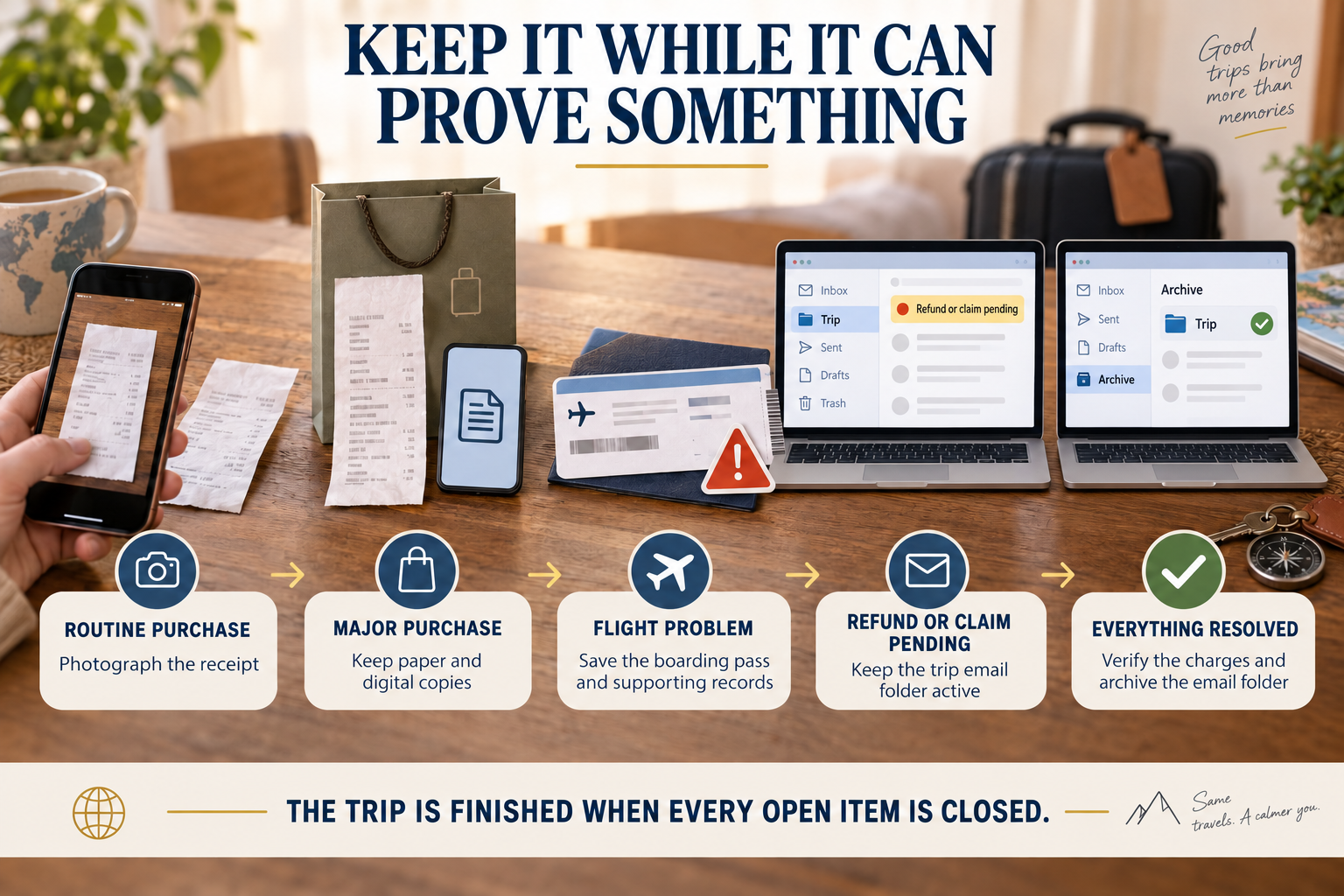
Not every receipt deserves the same treatment.
For an ordinary purchase, I may take a quick photograph of the receipt. That provides a temporary record without creating a pocket full of paper.
For a major purchase—generally something costing more than $500—I retain both the paper receipt and a digital copy while it may still be needed.
Boarding passes are similar.
If the flight operates normally and we arrive safely, I do not need to keep the boarding passes indefinitely.
If the flight is delayed, canceled or otherwise involved in a claim, I retain the boarding passes and supporting records. They may help establish that we checked in, boarded a particular flight or experienced a disruption.
The same principle applies to baggage records, replacement purchases and written communication with the airline.
Keep the Trip Active Until Everything Is Resolved
Returning home does not automatically mean the administrative part of the trip is finished.
There may still be:
A refund due
A travel-insurance claim
An airline reimbursement
A disputed hotel charge
A rental-car adjustment
Pending loyalty points
A damaged- or delayed-baggage issue
A major-purchase return or warranty concern
While any of those items remain open, I keep the trip’s email folder active.
The relevant messages, receipts and supporting records remain easy to find because the issue is not finished.
Once the refunds arrive, the charges are correct and every open item is resolved, I archive the email folder.
I do not maintain a permanent paper file. Necessary digital records remain in the archived email folder or another appropriate secure location, and the unneeded paper is discarded.
The trip is not finished when you get home. It is finished when the refunds arrive, the charges are correct and every open item is closed.
Start Small
You do not need to build the entire system for your next overnight stay.
Begin with three things:
Create one email folder for the trip.
Put time-sensitive reservations on the calendar.
Download the information you cannot afford to lose access to.
Then add the master document, checklists and paper backup when the length or complexity of the trip justifies them.
A weekend road trip may need very little infrastructure.
An international self-drive trip involving several lodging stops, multiple flights, a rental car and reserved experiences deserves more.
The system should expand and contract with the trip.
My Curated Verdict
🟢 Go for it: A simple repeatable system
Create one email home for every trip, add important reservations to the calendar and keep essential information available offline.
A small amount of organization before departure can save considerable time and stress later.
🟡 Evaluate it: Paper and duplicate backups
Carry paper copies when they would provide meaningful protection, particularly during international travel or a complex trip.
Keep the backup small, secure and limited to information that would actually help during a problem.
🔴 Skip it: Building a travel bureaucracy
Do not create a system so complicated that maintaining it becomes part of the vacation.
You do not need to document every meal, update every minor gate change or preserve every routine receipt forever.
The Bottom Line
Travel infrastructure is not about controlling every minute of a trip.
It is about knowing where to find the information that keeps the trip moving.
Give every trip an email folder. Use the calendar for reservations and helpful reminders. Keep the master document concise. Download essential information and maps to both phones. Carry a small paper backup when it provides real protection.
Then reuse the same foundation for the next trip.
The reward is not merely better organization.
It is the ability to change plans, explore freely and enjoy the trip without wondering where you put the confirmation number.
Set it up once. Use it for every trip.
Download the Curated Upgrades Travel Preparation Checklist
Use our printable two-page checklist to manage the homefront, pack the essentials and confirm that your most important travel information is available before departure.